Basic UsageHeartThoraxTMPLeadsToolsFocusPreferencesCase FilesVersionsDownload case filesUpdate ECGSIMPublicationsLicense terms
Transmembrane Potential (TMP)
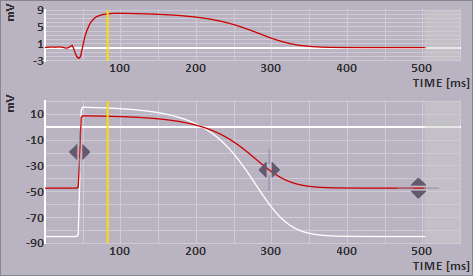
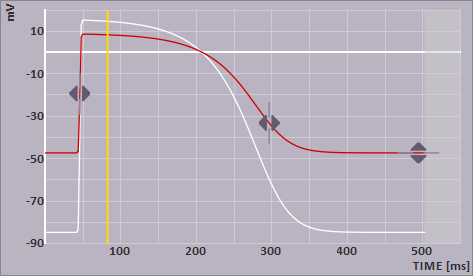
The TMP view displays the transmembrane potential at the selected node on the heart surface
(see heart view). The trace in
WHITE relates to the initial
parameter values, the one in RED relates to the user adapted
parameters.
The shape of the TMP can be changed by dragging the parameter handlers in the directions pointed
to by the white triangular arrows.
For changing the grid type see options/preferences.
The time bar (YELLOW) indicates a selected time instant, corresponding with the one shown in the leads view. It can be moved by a single left mouse click or dragging.
The image shown in the TMP view may be copied to the clipboard by selecting Copy from the TMP menu, or by pressing <Ctrl>-C while the mouse is within the TMP view.
Reset beat
By selecting -Reset beat- from the -Edit- main menu, or clicking on
the  toolbar button, all parameter changes untill that moment for the
selected beat and
shown (active) ventricle or atria will be undone to their
intial state.
toolbar button, all parameter changes untill that moment for the
selected beat and
shown (active) ventricle or atria will be undone to their
intial state.
Changing TMP waveform
Currently, ECGSIM supports 6 parameters to describe the TMP waveform at the selected node. These 6 parameters are divided into two functional groups that can accessed via the -modify timing/amplitude or waveform- item in the -Heart- main menu item.

the timing and amplitude parameters 1. depolarization time, the timing of the fastest upstroke of the TMP. 2. repolarization time, defined as the moment of maximum down-slope during repolarization. 3. resting potential, the minimum TMP, representing the value of the cardiac myocyte at rest. 4. amplitude, the maximum upstroke amplitude (not visible when the resting potential and amplitude handlers are combined). 
the slope parameters (TMP waveform) 5. the plateau slope; this is combined with the repolarization slope. It is constrained to be less than or equal to the repolarization slope (approximately phase 2). 6. the repolarization slope, which is combined with the plateau slope. It is constrained to be more than or equal to the plateau slope (approximately phase 3).
For each parameter an initial value exists (indicated in WHITE), and an user adapted value (indicated in RED. The used colors are also used in the leads view .
Double clicking on a handler resets the selected parameter to its initial value.
Show/hide electrogram
You may use this option, -Show EGM- in the -ECGs- main menu or the corresponding toolbutton under the signals button to show or hide the electrogram of the node selected on the heart surface.